AEO & GEO
How to Create llms.txt: A Step-by-Step Guide
16 min read

Adam Khaled
Founder, Web25
Adam Khaled
Founder, Web25
Quick answer: To create an llms.txt file, write a short Markdown text file with your business name as a heading, a one-line summary, and lists of links to your most useful pages, each with a short note. Save it as llms.txt, upload it to the root of your website, and check that it opens at yourdomain.com/llms.txt.
Someone told you to add an llms.txt file to your website. This guide shows how to create llms.txt in a few plain steps, what to put in it, and what it does and does not do. Web25 added one to web25.io while writing this guide, so the examples below come from a real, live file.
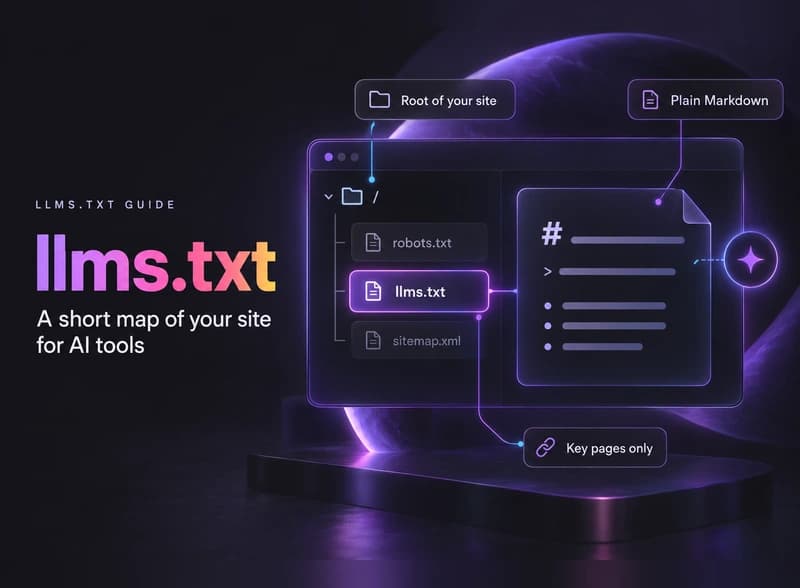
An llms.txt file is a plain text file, written in Markdown, that sits at the root of your website. It gives AI tools a short map of your site: who you are, and which pages matter most.
The idea comes from a proposal by Jeremy Howard, first published on September 3, 2024 and last updated on August 10, 2026.
His reasoning is simple. Web pages are built for people, with menus, scripts and layout around the text. A short text file is easier for an AI tool to read when it visits your site to answer a question.
Markdown is a simple way to format plain text. A line starting with # is a heading, a line starting with > is a quote, and [Page name](link) is a link. You can write it in any plain text editor.
There is no evidence yet that an llms.txt file gets you mentioned or cited more by AI tools. Treat it as a small, optional extra.
Google is clear about its own products. Its guide to AI features, last updated in December 2025, says: “You don’t need to create new machine readable files, AI text files, or markup to appear in these features.” That covers AI Overviews and AI Mode.
The data points the same way. SE Ranking studied nearly 300,000 domains in November 2025 and found an llms.txt file on 10.13 percent of them. Their models found no measurable link between having the file and how often AI tools cited the domain.
So why add one? It costs very little and it cannot hurt your rankings. If AI tools start relying on it, you are already set up. Writing it also makes you decide which pages on your site matter most, which is useful on its own.
Just do the basics first: make sure AI crawlers can reach your site and that your pages answer questions clearly. Our guide on how to optimize content for LLMs covers that order.
Here is how to create llms.txt by hand: choose your key pages, write them into a short Markdown file, upload it to the root of your domain, and test that it opens. For a small business website, this is a short job.
Choose the pages you would want an AI tool to read first. For most small businesses that is 10 to 30 pages: services, pricing, contact, case studies or reviews, and your best guides. Leave out login pages, carts, tag archives and anything thin or out of date.
Follow the order the proposal sets out:
Save the file as llms.txt in a plain text editor, such as Notepad on Windows or TextEdit in plain text mode on a Mac. Word processors add hidden formatting. Use UTF-8 encoding, which most editors use by default.
The file must open at yourdomain.com/llms.txt, in the same place as robots.txt. How you get it there depends on your platform, covered in the table further down.
Open yourdomain.com/llms.txt in a browser. It should show plain text, not your “page not found” page. Click a few links to check they work, then add a reminder to review the file when your key pages change.
An llms.txt file should hold plain facts: what your business does, where, and links to the pages that prove it. Here is a template for a made-up roofing company. Copy it and swap in your own details:
# Example Roofing Co.

> Example Roofing Co. is a family-owned roofing contractor in Columbus, Ohio. We repair and replace residential roofs and handle storm damage insurance claims.

We serve Columbus and towns within 30 miles. Free inspections, written quotes within 48 hours.

## Services

- [Roof repair](https://www.example.com/roof-repair): Leaks, missing shingles and flashing repairs, usually fixed in one visit
- [Roof replacement](https://www.example.com/roof-replacement): Full tear-off and replacement, materials we install, and how long it takes
- [Storm damage](https://www.example.com/storm-damage): How we inspect storm damage and help with insurance claims

## About and contact

- [Pricing](https://www.example.com/pricing): Typical price ranges for repairs and replacements
- [Reviews](https://www.example.com/reviews): Customer reviews and finished projects
- [Contact](https://www.example.com/contact): Phone, service area and how to book a free inspection

## Optional

- [Blog](https://www.example.com/blog): Roof maintenance guides for homeowners
Write each note the way you would describe the page to a new customer on the phone. “Typical price ranges for repairs” is useful. “The best roofing prices in Ohio” is an advert, and an AI tool may repeat it as a claim.
For a real example, this is the start of the file Web25 added to web25.io in October 2026. You can see the full live file:

Web25’s file is not typed by hand. The website builds it from the services list and from the articles and case studies stored in WordPress, so a new blog post appears in it without anyone editing the file.
It lists around 50 links. It is too early to say whether it changes anything, and we will report back once there is enough data.
Most platforms now have a built-in setting or a plugin for llms.txt, so you rarely need to touch your server.
| Platform | Easiest way | Good to know |
|---|---|---|
| WordPress with Yoast SEO | Yoast SEO, then Settings, Site features, AI tools, LLMS.txt. Turn it on and save. | Free and paid versions. You can pick pages by hand. Not available on multisite. Yoast guide |
| WordPress with Rank Math | Rank Math SEO, then Dashboard. Turn on the LLMS Txt module, then edit it under General Settings. | Choose post types and a link limit. Rank Math guide |
| WordPress, no plugin | Upload llms.txt by FTP or your host’s file manager to the folder that holds wp-config.php. | Use only one method. Two plugins making the file will clash. |
| Webflow | Site settings, then the SEO tab, then upload the file under LLMs.txt and publish. | UTF-8, under 100 KB, and it is not published to the webflow.io staging domain. Webflow guide |
| Shopify | Use an app. Yoast SEO for Shopify has it under Settings, Advanced, llms.txt. | Shopify has no built-in place to upload a file to the root of your domain. Yoast for Shopify guide |
| Next.js or a custom site | Put llms.txt in the public folder, or build it with a route that reads your content. | A route keeps it up to date on its own. That is how web25.io does it. |
robots.txt sets the rules for crawlers, sitemap.xml lists every page for search engines, and llms.txt is a short, hand-picked guide for AI tools. They do different jobs, and llms.txt replaces neither of the other two.
| File | What it does | Who reads it | Do you need it? |
|---|---|---|---|
| robots.txt | Tells crawlers which parts of the site they may crawl | Search engine and AI crawlers | Yes, most sites should have one |
| sitemap.xml | Lists all the pages you want found, with update dates | Google, Bing and other search engines | Yes, it helps search engines find pages |
| llms.txt | Summarizes your site and links your most useful pages | AI tools and agents that choose to look for it | Optional, no proven effect yet |
One point causes confusion often. An llms.txt file cannot block anything. If an AI crawler cannot reach your site, the fix is in robots.txt or your hosting settings. Our article on Cloudflare’s AI crawler defaults shows one common cause.
The most common mistakes come from treating llms.txt like a sitemap or an advert.
Web25 is our agency. This guide covers it alongside alternatives.
Most business owners can add llms.txt themselves with the steps above or a plugin, and there is no need to pay anyone for that part alone.
If you want the bigger picture checked, such as AI crawler access, page structure, schema markup and tracking whether AI tools mention you, that is part of our SEO, GEO and AEO service. Our guide on how to appear in Google AI Overviews is a good next read.
No. llms.txt is a proposal, written by Jeremy Howard and published at llmstxt.org in September 2024. It has not been adopted by a standards body, and Google says you do not need AI text files to appear in its AI features. Treat it as an optional extra, not a requirement like a working sitemap.
No. An llms.txt file only suggests which pages are worth reading. It has no rules for allowing or blocking anything. If you want to stop a specific AI crawler, add a rule for it in your robots.txt file, and check your hosting or Cloudflare settings, which can block AI crawlers on their own.
For a small business website, one screen is usually enough: a heading, a summary, and 10 to 30 links to your services, pricing, contact page, case studies and best guides. The file is meant to be a short map, not a copy of your sitemap. Webflow, for example, limits uploaded llms.txt files to 100 KB.
Usually not. Some documentation sites publish an llms-full.txt file that contains the full text of their docs in one place, so a coding tool can read everything at once. A typical business website has no need for that. A short llms.txt with good links covers the idea.
No. An llms.txt file does not change your pages, your titles or your robots rules, so it has no effect on how Google ranks your site. Google states that you do not need AI text files for its AI features, so the file neither helps nor hurts your Google results. Keep the links in it accurate.
Update it whenever you add, rename or remove an important page, such as a new service or a pricing page. If a plugin like Yoast SEO or Rank Math builds the file for you, it updates on its own. For a file you wrote by hand, check it every few months for broken or missing links.
Yes, as a first draft. Give it your list of key pages and ask for the llms.txt format. Then check every link by opening it, and rewrite any note that sounds like an advert. The file should state plain facts about each page, because an AI tool will repeat what you put there.
Open yourdomain.com/llms.txt in your browser. If you get a “page not found” error, pick your ten most useful pages, fill in the template above, and upload it with the method for your platform. If you would like a second pair of eyes on your site’s AI visibility, book a discovery call.
Written by Adam Khaled, Founder, Web25. Last updated October 2026.

A zero-click search strategy in plain English: why fewer people click, what Web25’s own Google data shows, and how to stay visible when nobody clicks.

Schema markup for AI search in plain English: what Google and Microsoft say it does, which types a small business needs, and how to add and test it.
Webflow vs WordPress in plain English: hosting, cost, design, SEO, maintenance and plugins compared, plus a simple way to decide which fits your business.