Website Care & Performance
Website Maintenance Packages: 2026 Price Guide
9 min read

Adam Khaled
Founder, Web25
Adam Khaled
Founder, Web25
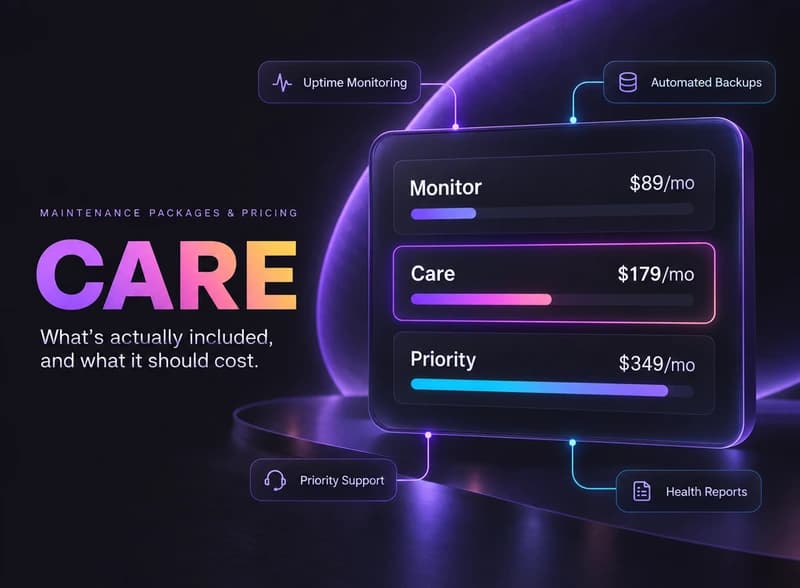
Quick answer: Website maintenance packages cost about $75 to $300 a month from a freelancer and $200 to $1,000+ a month from an agency, per Sitewired’s 2026 WordPress maintenance guide, depending on site complexity and how hands-on the support is. At minimum, a package should include uptime and security monitoring, automated backups and software updates, because backups alone aren’t maintenance. Web25’s own three tiers run $89-$349/month (Monitor, Care, Priority), each adding more proactive work and faster response time.
Website support and maintenance means different things to different vendors, which is why prices vary so widely. At minimum, a legitimate package includes three things: 24/7 uptime and security monitoring, automated backups on a regular schedule, and software/plugin/theme updates applied on a schedule, not “whenever.” A package that only offers backups isn’t maintenance — it’s a backup service with a bigger price tag.
Higher-tier packages add proactive work: broken-link checks, performance tuning, a monthly health report in plain English, some amount of content-edit time, and faster response windows when something breaks. The jump in price between tiers should track a real jump in what’s actually being done, not just a bigger number next to the same checklist.
Per Sitewired’s 2026 guide, WordPress maintenance costs break down roughly like this: DIY setups run $0-$50/month and typically cover hosting, backups, and a few plugins. Freelancer-supported maintenance runs $75-$300/month depending on scope. Agency-level services run $200-$1,000+/month, and ecommerce, membership or high-traffic sites can exceed that range.
Site type matters as much as vendor type. Per Codeable’s March 2026 guide, a personal site or blog runs $0-$50/month, a small business site $100-$300/month, a business or membership site $150-$500+/month, and ecommerce or WooCommerce $300-$1,000+/month. If a quote falls far outside these ranges in either direction, ask exactly what’s included before assuming it’s a good deal.
Per Sitewired, a typical WordPress maintenance plan includes core, plugin and theme updates. A real package tests those updates before they go live on a production site, not just runs them and hopes nothing conflicts.
Web25 is our agency, and website maintenance is one of the services we run day to day, alongside web development and SEO/AEO. If you want a straight answer on what your own site actually needs, see our maintenance plans, read our content pruning case study for what removing unused pages did to one large site, or book a discovery call.
To make this concrete rather than abstract, here’s how Web25 structures its own three maintenance tiers — not as the only right way to do it, but as a real, priced example of how the checklist above maps to cost.
Monitor ($89/month) is the safety-net tier: 24/7 uptime and security monitoring, automated daily backups, critical security patches only, and a monthly uptime/backup report. Anything beyond that is billed hourly. It’s built for sites that mainly need to know nothing has silently broken.
Care ($179/month) adds weekly software and plugin updates, broken-link and error checks, one hour of content edits a month, a plain-English monthly health report, and priority email support. This is the tier built for a business that wants the site handled without thinking about it.
Priority ($349/month) adds performance tuning on top of weekly updates, three hours of content edits a month, same-day emergency response, a monthly strategy call, and a staging environment so changes get tested before they touch the live site. It’s built for higher-traffic sites where downtime has a real cost.
Start with how much downtime would actually cost your business. A site that generates leads or sales every day needs faster response and a staging environment; a mostly-static informational site usually doesn’t. Then check what you’re already paying for elsewhere — if your host already includes backups, don’t pay twice for the same thing under a different name. When in doubt, a real vendor should be willing to tell you honestly if a cheaper tier is enough.
For a WordPress site, freelancer-supported maintenance typically runs $75-$300/month, and agency-level services run $200-$1,000+/month, per Sitewired’s 2026 guide. The exact cost depends on site complexity, traffic, and how proactive the support is, not just the hosting platform.
WordPress maintenance runs roughly $75-$300/month for freelancer support and $200-$1,000+/month for agency service, per Sitewired’s 2026 guide.
At minimum: 24/7 uptime and security monitoring, automated backups on a schedule, and regular software/plugin updates. A package that only offers backups isn’t real maintenance — it’s a backup service priced like one.
DIY/automated-only setups ($0-$50/month) can work for a low-stakes personal site, but they typically mean no human review of updates before they go live. Any site that generates leads, sales, or reputation-sensitive traffic benefits from a paid plan that actually tests changes before they hit production.
Higher tiers should add real proactive work — performance tuning, faster response times, content-edit hours, a staging environment — not just a bigger number next to the same checklist. A legitimate price jump between tiers should track a real jump in what’s being done.
Routine work sits inside the monthly fee. Codeable says emergency and ad-hoc development is billed separately by most maintenance providers at $75-$200+/hour, and custom work is quoted as project work on top of your monthly plan. Ask which jobs fall outside the plan before you sign.
Check whether your current plan actually includes tested updates and a real backup schedule, not just “we’ll fix it if it breaks.” If you want a plain-English read on what your site needs, see our maintenance plans or book a discovery call.
Written by Adam Khaled, Founder, Web25. Last updated October 25, 2026.

Odoo Shopify integration in 7 steps: check your Odoo plan and hosting, pick an Odoo module, a Shopify app or custom code, and sync stock across locations.

QuickBooks Shopify integration in 7 steps: pick the right QuickBooks, choose an app or custom code, and make each Shopify payout match your bank deposit.

ERP website integration explained: what your website can pull from or send to your ERP, five ways to connect them, and 6 steps to scope the job.